TL;DR: We take raw, messy timesheet data, clean and standardize it in R, convert it into accurate hour calculations, automatically generate payroll vouchers for each staff member, and produce a clean summary file for tracking and reporting-all with minimal manual effort.
Note: This article is meant to be demonstrative. The goal is to show what’s possible with semi-automation using R and not to cover every edge case or implementation detail. In the next article, we’ll go deeper into the logic, extensions, and decision-making power this workflow unlocks.
One of the most time-consuming operational tasks in a grassroots soccer club is payroll. Hours are tracked in inconsistent formats, spread across wide spreadsheets, and manually retyped into vouchers. Every step introduces friction, delays, and risk of error.
This project solves that problem by turning raw timesheet data into fully automated payroll vouchers using R.
The Problem
Many clubs track staff hours in wide spreadsheets where each date is a column and each cell contains a time range as seen below.
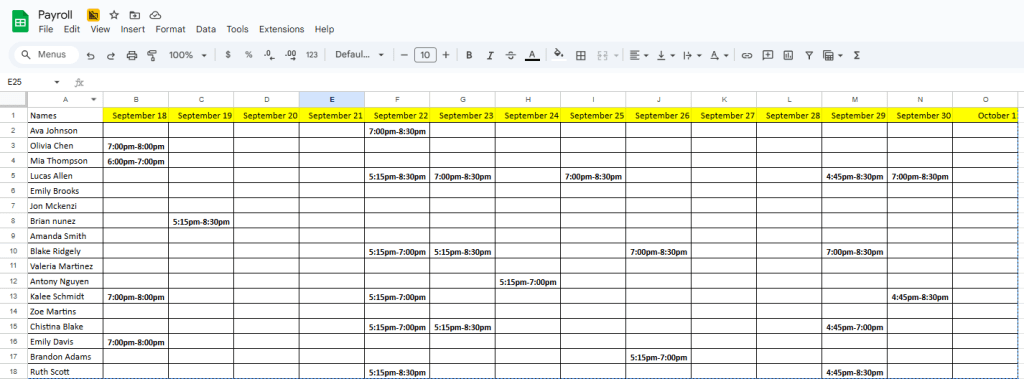
While this works for data entry, it breaks down when you need to:
- Calculate hours accurately
- Standardize formats
- Generate vouchers for Accounts Payable
- Produce summaries for payroll tracking
Manual processing doesn’t scale and doesn’t age well.
The Solution
This system converts raw payroll sheets into a clean, repeatable workflow:
- Normalize the data
Dates are parsed from column headers and converted into a proper time series format. Time ranges are split into start and end times, validated, and converted into exact hours worked. - Transform wide data into long format
Each row becomes one person, one date, one time range. This structure is far easier to audit, calculate, and extend. - Automate voucher creation
For each staff member, the system:- Calculates total hours
- Applies a fixed hourly rate
- Generates a formatted voucher (Word document)
- Includes all required fields (GL number, description, dates worked, totals)
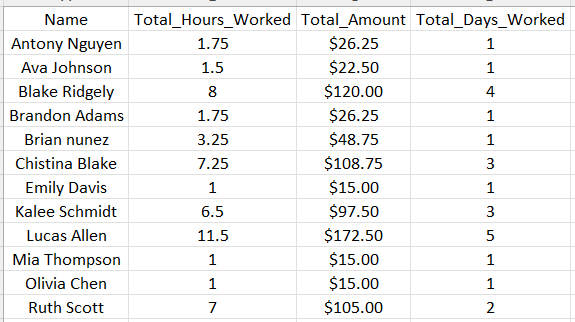
- Create a payroll summary automatically
A companion Excel file summarizes:- Total hours worked
- Total amount owed
- Number of days worked per staff member
No manual calculations. No copy-paste.
| Field | Soccer Voucher |
| Date | 2026-01-11 |
| Name | Lucas Allen |
| Description | TINY TOES Referee Hours |
| Amount | $172.5 |
| GL Number | 45-12-59765 |
| Date(s) Worked | 09/22/2026 (3.25) 09/23/2026 (1.5) 09/25/2026 (1.5) 09/29/2026 (3.75) 09/30/2026 (1.5) |
| Hours Worked | 11.5 |
| Hourly Rate | $15 |
| Requested By | Tads Mhinga |
| Check Number |
Why this matters
- Accuracy: Hours and pay are calculated consistently every time.
- Speed: What used to take hours now runs in seconds.
- Auditability: Every voucher is traceable back to raw time entries.
- Scalability: The same workflow works for 5 staff or 50 staff without extra effort.
Most importantly, it frees administrators to focus on running the club instead of wrestling spreadsheets.
The Bigger picture
This voucher automation system is an example of how data engineering principles can be applied at the grassroots level. You don’t need enterprise software to build professional operations, you need clean data, clear logic, and repeatable pipelines.
This is the foundation of treating a soccer club like a modern organization, not a collection of ad-hoc processes.
 pivotfootball